Ever wondered how Google shows the perfect answer in just seconds?
Search engines work behind the scenes using powerful systems that discover, organize, and rank billions of web pages across the internet.
In this guide, you’ll learn how search engines work, from crawling and indexing to ranking results and penalties along with practical optimization and troubleshooting tips.
So, How Do Search Engines Work?
Search engines use web crawlers (bots) to explore the internet and collect content from websites. Once the content is discovered, it’s analyzed, stored, and organized in a massive database called an index.
When a user performs a search, the search engine’s algorithms quickly scan this index and display the most relevant and trustworthy results, based on factors like:
- Content relevance
- Authority and backlinks
- User experience and performance
All of this happens in a fraction of a second.
Key Takeaways: How Search Engines Process Information
Crawling
Search engines discover new and updated web pages using automated crawlers.
Indexing
The collected content is analyzed and stored in the search engine’s index.
Ranking
The most relevant pages are ranked and shown based on the user’s search query.
Penalties
Websites that violate guidelines may be demoted or removed from search results.
Think of Search Engines Like Digital Librarians
Search engines act like expert librarians of the internet. They don’t just store information they:
- Organize content logically
- Evaluate quality and relevance
- Serve the best answers to users worldwide
Just as a librarian helps you find the right book, search engines help users find the right information at the right time.
Read Also: CRM For Real Estate
Why Understanding Search Engines Matters
Whether you’re a:
- Website owner
- Blogger
- Business or marketer
Understanding how search engines work helps you:
✔ Improve website visibility
✔ Avoid penalties
✔ Create content that ranks and converts
This beginner-friendly guide gives you the foundation you need to build strong, search-friendly websites.
How Do Search Engines Work?
Have you ever wondered how Google finds the exact page you’re looking for in seconds?
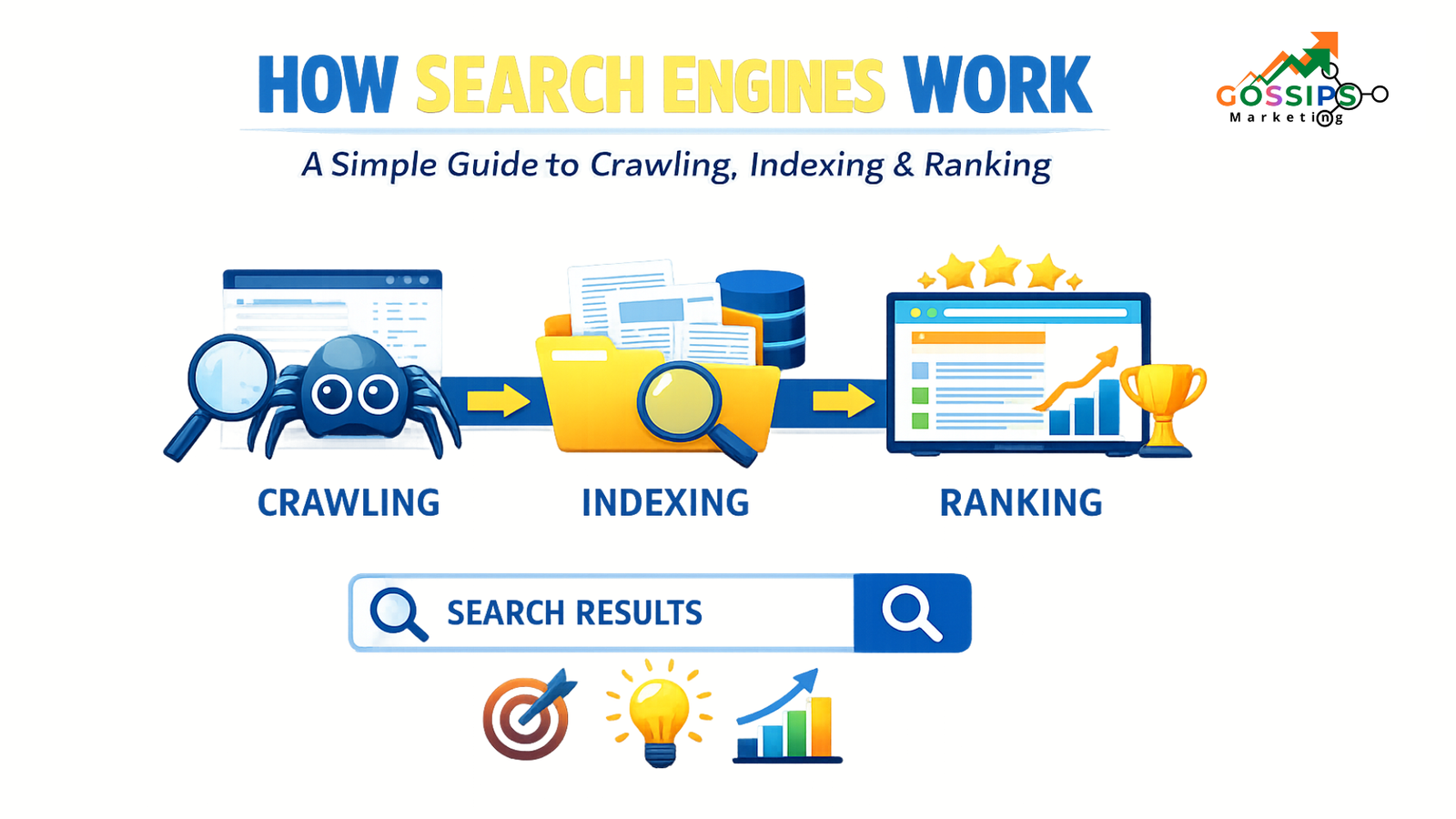
Search engines work through a three-step process that helps them discover, understand, and display information from across the internet:
- Crawling: Finding content
- Indexing: Understanding and storing content
- Ranking: Showing the best results to users
Let’s break down each step in a simple way.
1. Crawling: How Search Engines Discover Content
What Is Crawling?
Crawling is the process where web crawlers (also called spiders or bots) explore the internet to find new and updated content. This content can include:
- Web pages
- Images
- Videos
- Previously crawled pages with updates
Think of crawling like a librarian searching for new books to add to a library’s collection.
Why Crawling Is Important
Crawling is the starting point of the entire search engine process.
If a page isn’t crawled, it cannot appear in search results.
Without crawling:
- Content won’t be discovered
- Pages won’t be indexed
- Rankings won’t exist
In short, search engines can’t function without crawling.
How Crawling Works
Search engines begin crawling by revisiting pages already stored in their index. From there, they follow links to discover new content across the web.
Because crawling the entire internet requires massive resources, search engines use smart algorithms to decide:
- Which websites to crawl
- How often to crawl them
- How many pages to crawl per site
Well-structured websites with clear internal links and fresh content are crawled more frequently.
User Tip: How to Help Search Engines Crawl Your Site Better
- Use clear internal linking
- Submit an XML sitemap
- Fix broken links
- Keep your site fast and mobile-friendly
Understanding crawling helps you build websites that are easy for search engines to discover, setting the stage for better indexing and higher rankings.
Popular Crawling Tools and Their Uses
| Tool | Purpose |
|---|---|
| Google Search Console | Monitor crawling activity, check crawl stats, and fix indexing or crawl errors |
| Screaming Frog SEO Spider | Simulate how search engines crawl your website and uncover technical SEO issues |
| Robots.txt Tester | Test and validate crawling rules to control which pages search engines can access |
Additional Crawling Tools You Should Know
| Tool | Purpose |
|---|---|
| Ahrefs Site Audit | Identify crawlability issues, broken links, and blocked pages |
| SEMrush Site Audit | Analyze crawl depth, duplicate pages, and technical SEO errors |
| Sitebulb | Visualize crawl paths and detect structural issues |
| DeepCrawl (Lumar) | Enterprise-level crawling and website health monitoring |
| OnCrawl | Advanced crawl data analysis for large websites |
| Bing Webmaster Tools | Monitor crawling and indexing for Bing search engine |
Why Crawling Tools Matter
Using the right crawling tools helps you:
✔ Detect blocked or broken pages
✔ Improve crawl budget usage
✔ Fix technical SEO issues early
✔ Ensure important content gets indexed
Crawling Optimization: How to Help Search Engines Discover Your Website Faster
Crawling optimization ensures that search engine bots can easily find, understand, and navigate your website. When crawling is optimized, your important pages get discovered faster—leading to better indexing and improved rankings.
Let’s look at the most effective ways webmasters can optimize crawling.
Create a Robots.txt File (Control What Crawlers Can See)
A robots.txt file works like a gatekeeper for your website. It tells search engine crawlers which pages they are allowed to visit and which areas should stay private.
Why it matters:
- Prevents crawlers from accessing unnecessary pages
- Protects paid landing pages or admin sections
- Helps focus crawl budget on important content
Use robots.txt to guide crawlers toward content you want indexed—and away from what you don’t.
Build and Submit an XML Sitemap (Give Crawlers a Roadmap)
An XML sitemap is like a city map for search engines. It lists all the important pages on your website so crawlers don’t miss anything.
Best practice:
- Create an XML sitemap
- Submit it via Google Search Console or Bing Webmaster Tools
- Update it whenever you add or remove pages
This helps search engines discover your content faster and more efficiently.
Optimize Internal Linking (Make Navigation Easy)
Internal links act like roads connecting different areas of your site. They help both users and search engines move smoothly from one page to another.
How to do it right:
- Add 3–5 internal links per page
- Link to relevant and high-priority pages
- Use clear, descriptive anchor text
Strong internal linking improves crawlability and helps new pages get discovered quicker.
Add Canonical Tags (Avoid Duplicate Content Confusion)
Canonical tags work like road signs, telling search engines which version of a page should be considered the main one.
Why canonical tags are important:
- Prevent duplicate content issues
- Guide crawlers to the correct URL
- Ensure the right page gets indexed
They are especially useful for large or complex websites with similar URLs.
Publish Content Regularly (Signal Website Activity)
Fresh content tells search engines that your website is active and relevant. When you publish new or updated content consistently, crawlers visit your site more often.
Recommended frequency:
- Blogs: weekly or bi-weekly
- Core pages: update monthly or as needed
Regular publishing improves crawl frequency and keeps your site visible in search results.
Troubleshooting Crawling Errors: How to Fix Common Issues Fast
If search engines aren’t crawling your website properly, your pages may never appear in search results. The good news? Most crawling errors are easy to identify and fix once you know where to look.
Below are practical steps to help you troubleshoot crawling issues effectively.
Audit Your Robots.txt File (Check Access Restrictions)
Your robots.txt file controls which parts of your website search engine bots can access. If important pages are blocked, crawlers won’t be able to reach them.
What to do:
- Review your robots.txt file carefully
- Look for accidental “Disallow” rules
- Test URLs using Google’s Robots Testing Tool
This tool lets you enter a page URL and instantly see whether crawlers are allowed or blocked.
Fix HTTP Network Errors (404, 301, and More)
HTTP errors are one of the most common reasons for crawling problems. Errors like 404 (page not found) or 301 redirects can stop crawlers from accessing content properly.
How to identify these issues:
- Use Google Search Console → Pages report
- Run a crawl with Screaming Frog
What to fix:
- Repair broken links
- Remove redirect chains
- Update outdated URLs
Cleaning up HTTP errors improves both crawlability and user experience.
Resolve Server Errors (Ensure Crawlers Can Reach Your Site)
Server-related issues can block crawlers entirely, even if your site looks fine to users.
Common causes include:
- Firewall or security restrictions
- Sudden traffic spikes
- Poor hosting performance
How to troubleshoot:
- Check server and firewall settings
- Monitor traffic for unusual spikes
- Upgrade your hosting plan if resources are limited
A stable server ensures search engine bots can access your site consistently and reliably.
2. Indexing: How Search Engines Store and Understand Your Content
Once search engines discover your pages through crawling, the next step is indexing. This is where search engines decide whether your content is good enough to be saved and shown in search results.
What Is Indexing?
Indexing is the process where search engines process, analyze, and store crawled content in their massive database (called an index).
Not every page makes it into the index. Search engines filter out:
- Duplicate content
- Low-quality or thin pages
- Pages marked with noindex tags
Think of indexing like a librarian organizing a library—only useful, high-quality books are added to the shelves.
Why Indexing Is Important
Indexing determines what content is eligible to appear in search results.
If a page isn’t indexed, it simply won’t rank, no matter how well it’s optimized.
Indexing helps search engines:
- Maintain content quality
- Deliver accurate and relevant results
- Build a reliable “content library” for users
Quality matters here more than quantity.
How Indexing Works
After crawling, search engines analyze each page to decide if it should be indexed. During this process, they evaluate elements such as:
- Canonical URL (main version of the page)
- Title tags and headings
- Text content and keywords
- Images, videos, and alt text
- Language and usability
- Mobile-friendliness and page structure
Only pages that meet quality and eligibility standards are added to the index.
Indexing Tools: Monitor and Fix Indexing Issues
To ensure your pages are properly indexed, SEO professionals rely on the following tools:
| Tool | Purpose |
|---|---|
| Google Search Console | Monitor indexing status, submit URLs, and fix indexing issues for Google |
| Bing Webmaster Tools | Track indexing performance and troubleshoot issues for Bing search engine |
Indexing Optimization: How to Make Your Content Easy to Understand & Index
Getting your pages crawled is only half the job. To appear in search results, your content must also be easy for search engines to understand, evaluate, and store. That’s where indexing optimization comes in.
Below are proven ways webmasters can optimize their websites for better indexing.
Create High-Quality, People-First Content
Search engines like Google prioritize helpful, original, and reliable content. Pages that truly solve user problems are far more likely to be indexed.
How to do it right:
- Share original insights, data, or explanations
- Answer real user questions clearly
- Avoid thin, copied, or generic content
When your content adds real value, search engines recognize it as index-worthy.
Add Clear Meta Tags (Titles & Descriptions)
Meta tags act like your page’s headline and summary in search results. They help search engines—and users—understand what your page is about.
Best practices:
- Title tag: up to 60 characters
- Meta description: up to 150 characters
- Include the primary keyword naturally
Well-written meta tags improve indexing and boost click-through rates.
Use Header Tags to Structure Your Content
Header tags (H1, H2, H3) create a logical content hierarchy that helps search engines understand topic coverage.
Tips for proper usage:
- Use only one H1 per page
- Break sections into clear H2s and H3s
- Keep headings descriptive and relevant
A clean structure benefits both SEO and readability.
Include Multimedia for Better Understanding
Search engines evaluate how well your content engages users—and multimedia plays a big role.
What to include:
- Images, screenshots, or graphics
- Videos or visual explainers
- Informative charts or diagrams
Don’t forget to add alt text to images so search engines can “read” them and improve accessibility.
Build a User-Friendly Website Experience
A user-friendly website improves indexing because search engines prioritize pages that are easy to use and access.
Key usability factors:
- Responsive (mobile-friendly) design
- Fast loading speed
- Clear navigation
- High-contrast text for accessibility
These improvements often require help from a web designer or developer—but they deliver long-term SEO benefits.
Use Canonical Tags to Avoid Confusion
Just like crawling optimization, indexing also benefits from canonical tags. They tell search engines which version of a page should be indexed, helping avoid duplicate content issues.
Troubleshooting Indexing Issues
If your pages aren’t appearing in search results, follow these simple steps to fix indexing issues:
1. Check Indexability
- Ensure the page is not blocked by
robots.txt - Remove any noindex meta tags
- Add the page to your XML sitemap
- Use Google Search Console → URL Inspection to confirm
2. Fix Duplicate Content
- Identify duplicates using Google Search Console or Screaming Frog
- Apply canonical tags to preferred URLs
- Use 301 redirects where needed
- Rewrite content to make it unique
3. Improve Content Quality
- Follow Google’s Helpful Content guidelines
- Ensure content is original, useful, and trustworthy
- Avoid thin or copied content
4. Test Usability & Performance
- Check mobile-friendliness
- Improve page speed
- Fix layout and accessibility issues
- Use Mobile-Friendly Test or Chrome DevTools
3. Ranking
Definition:
Ranking is the process where search engines decide which pages appear in search results and in what order after a user submits a query. To do this, search engines rely on sophisticated algorithms that evaluate hundreds of signals to deliver results that are relevant, helpful, and easy to use. Ranking works much like a librarian suggesting the most suitable book based on a reader’s specific needs.
Importance:
Ranking is what sets one search engine apart from another. A search engine that consistently shows accurate, useful, and relevant results builds trust with users. When users find better answers faster, they are more likely to return to that search engine and recommend it to others.
How it works:
Ranking happens in just milliseconds. The moment a user enters a search query, the search engine scans its index and evaluates pages based on multiple factors. These include content relevance, quality, usability, and user context—such as device type or location. Using this data, the search engine selects and displays the best possible results for the user.
Ranking Tools
To improve search rankings, webmasters rely on several SEO tools that help identify issues and growth opportunities:
- Screaming Frog – Scans websites to detect technical SEO issues and uncover optimization opportunities.
- Google PageSpeed Insights – Analyzes page speed and highlights areas that can improve website performance.
- Keywords Everywhere – Helps discover high-value keywords and analyze search demand for better targeting.
Ranking Optimization
Improving rankings requires applying proven SEO techniques and best practices. Here’s how you can optimize effectively:
Target the Right Search Queries
Use relevant keywords naturally in your title tags, headings, and content. Proper keyword research helps identify search terms your audience is actively using.
Optimize for Local Searches
Search results vary by location. If your business serves a specific area, focus on location-based keywords (e.g., city or region names) to improve visibility in local searches.
Write with Search Intent in Mind
Study the top-ranking pages for your target keywords. Enhance your content by answering common user questions, improving structure, and prioritizing information based on user needs.
Review Key Ranking Signals
Although search engines don’t reveal all ranking factors, some confirmed signals include:
- Secure HTTPS pages
- Fast loading speed
- Helpful and high-quality content
Using these signals as guidelines can significantly improve your rankings.
Technical SEO Essentials
Strong rankings also depend on proper crawling and indexing. Make sure you regularly audit and optimize:
- Robots.txt file
- XML sitemap
- Canonical tags
- Internal linking structure
- Meta tags (title & description)
- Header tags (H1–H6)
- Images and multimedia
- Content quality
- Overall website usability
Troubleshooting Ranking Issues
If your website is not ranking as expected, try these quick checks to identify the problem:
Review Search Intent
User intent can evolve over time. Compare your content with current top-ranking pages to see whether user expectations have changed, making your content less relevant.
Analyze Keyword Trends
Keyword demand can rise or fall. Tools like Google Trends help track keyword popularity over time. Increased interest often means higher competition, which can impact rankings.
Technical Checks That Matter
Ranking issues are often linked to crawling and indexing problems. Make sure to review the following:
- Audit your robots.txt file
- Fix HTTP and network errors
- Resolve server-related issues
- Identify and remove duplicate content
- Improve overall content quality
- Test usability and user experience across devices
4. Penalties
📚 Definition:
Penalties occur when search engines lower a website’s rankings or completely remove it from their index. This happens when indexed content breaks spam guidelines or tries to unfairly influence search results. Think of penalties as a librarian removing an unreliable book from the shelves.
💡 Importance:
Penalties protect the quality of search results. They help search engines focus on trustworthy, helpful websites and prevent low-quality or manipulative pages from appearing in front of users.
⚙️ How it works:
Search engines rely on automated systems, human reviewers, and user feedback to spot policy violations. When an issue is confirmed, they may apply a manual action or reduce the visibility of affected pages sometimes removing them from search results entirely.
Tools to Check Penalties
The most commonly used tools for penalty detection include:
| Tool | Purpose |
|---|---|
| Google Search Console | Identify penalties and submit fixes for Google search issues |
| Bing Webmaster Tools | Review penalties and request reconsideration for Bing |
Optimizations to Avoid Penalties
Website owners can reduce penalty risks by avoiding these practices:
- Cloaking:
Showing different content to search engines and users with the intent to deceive. Legitimate personalization does not fall under cloaking. - Hidden text:
Adding text that users can’t see but search engines can, such as matching text color with the background. - Keyword stuffing:
Overusing keywords to the point where content becomes unreadable. Focus on natural language and user experience. - Link spam:
Buying or manipulating backlinks. Earn links organically by publishing valuable and relevant content.
For full clarity, always review Google’s official spam guidelines before implementing SEO tactics.
Troubleshooting Penalties
If your site may be affected by penalties, try the following steps:
- For confirmed penalties:
Check the penalty details provided by the search engine. In Google’s case, review the Manual Actions report in Google Search Console and follow the recommended fixes before submitting a reconsideration request. - For unconfirmed penalties:
Reassess your content and SEO practices. Look for warning signs such as unnatural keyword usage or suspicious backlinks.
Important note:
In rare situations, a website can be permanently removed from a search engine’s index. If penalty recovery feels complex, working with an experienced SEO professional can help prevent long-term damage.
Achieve top rankings on search engines with gossipsmarketing.com
Getting your website to rank higher isn’t just about keywords — it’s about understanding how search engines crawl, index, and rank your content. At Gossips Marketing, we simplify SEO by combining proven strategies, smart tools, and hands-on expertise to help your website perform better in search results.
Our team focuses on technical SEO, content optimization, and performance improvements that align with real search engine guidelines. Whether you’re struggling with visibility, indexing issues, or ranking drops, we provide clear solutions backed by data and experience.
What we help with:
- Search engine crawling and indexing optimization
- Keyword and search intent analysis
- On-page and technical SEO improvements
- Long-term ranking and traffic growth strategies
Ready to improve your online presence the right way?
👉 Connect with Gossips Marketing today and take the first step toward sustainable search growth.
[…] Read Also: How search engines work […]
[…] Read Also: How Search engines work […]